Showing posts with label PHP. Show all posts

Saturday, 7 April 2012

PHP: How To Create Thumbnail image.

Someone may wonder that when we have Photoshop, why do we bother to create thumbnail images using Php? Well answer is quite easy, whenever you upload photos to your web site to attract your readers or someone, every time you will have to cut or crop or do something on your photos by manually. Is not it annoying?
Once you completed your few lines of code you will no longer suffer from editing photos.
Here is your source code.

// Path of photo.
$img_name="Gear2nd.sized.jpg";
//In this case thumbnail image size will be twice smaller than its original.
//based on original photo's size this size can be changed.
$thm_size=2;
// Type
header('Content-type: image/jpeg');
// Generating Thumbnail's size.
list($width, $height)=getimagesize($img_name);
$new_width=$width / $thm_size;
$new_height =$height / $thm_size;
// Generating thumbnail image
$thm_img=imagecreatetruecolor($new_width, $new_height);
$img=imagecreatefromjpeg($img_name);
imagecopyresampled($thm_img, $img, 0, 0, 0, 0, $new_width, $new_height, $width, $height);
// show off the thumbnail
imagejpeg($thm_img, null,100);

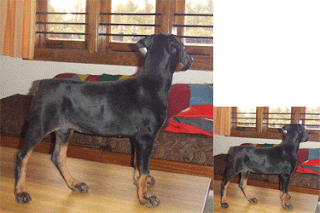
Result :
Good luck

Saturday, 3 December 2011

PHP: Validating email address.

function emailValidate($email)
{
   if(!eregi("^[a-z]+[a-z0-9_-]*(\.[a-z0-9_-]+)*@[a-z0-9]+
      (\.[a-z0-9_-]+)*\.(\.[a-z]+){2,}$",$email))
  {
      return true;
  }
  return false;
}

eregi case insensitive regular expression math.

Wednesday, 30 November 2011

PHP: data grid view

Lets demonstrate how to show data in data grid view using php.
When we are working on website, one of the most important things is to show the data in brief and in a nice way
To do that combining HTML tags along with php.
Now lets see small example

Tuesday, 10 May 2011

PHP : Login Page


Here is simple guide to create login page. About design, you can create one as you like using html. This is simple design that i created to demonstrate how login page works. You can use just two text-boxes and submit button, that is all.

Make sure that your text-boxes and submit button are inside the "Form" which uses method field and action field as shown below.

<Form name="Form1" method="post" action="login.php"> ...
When you hit login or submit button, all data which are inside this form will be thrown to login.php.
And they won't appear in address bar. Because method is post.